
Public Datasets #
Brainlife Connects provides seamless access to thousands of open neuroimaging, connectomics, and neurophysiology datasets through the Public Datasets hub (/public-datasets).
Datasets can be searched, explored, filtered by modality, and copied directly into your projects as virtual DataLad references—without requiring manual downloads or consuming your local disk space.
Supported Public Repositories #
From the Public Datasets hub (/public-datasets), you can access four primary open-science data sources:
                          ┌───────────────────────────┐
                          │   Public Datasets Hub     │
                          │   (/public-datasets)      │
                          └─────────────┬─────────────┘
                                        │
      ┌──────────────────┬──────────────┴──────────────┬──────────────────┐
      ▼                  ▼                             ▼                  ▼
┌─────────────┐  ┌───────────────┐             ┌───────────────┐  ┌───────────────┐
│   Dataset   │  │ DANDI Archive │             │    BossDB     │  │ EMBER Archive │
│   Library   │  │  (Cellular /  │             │ (Connectomics │  │(Neurophysiol. │
│ (/library)  │  │  Electrophys) │             │  & EM / S3)   │  │   & FAIR)     │
└─────────────┘ └───────────────┘ └───────────────┘ └───────────────┘- Dataset Library (
/public-datasets/library): Curated public neuroimaging collections (including OpenNeuro and benchmark studies) packaged with standardized DataLad versioning for immediate import into Brainlife projects. - DANDI Archive (
/public-datasets/dandi): Distributed Archives for Neurophysiology Data Integration. Direct search and exploration of cellular and extracellular neurophysiology datasets (NWB format). - BossDB (
/public-datasets/bossdb): Brain Observatory Storage Service for petascale volumetric electron microscopy and connectomics data, featuring direct 3D visualizers and an integrated S3 Browser (/public-datasets/bossdb/s3-browser). - EMBER Archive (
/public-datasets/ember): FAIR neurophysiology datasets providing standardized access for discovery, visualization, and reproducible computing.
1. Browsing the Dataset Library #
To explore curated neuroimaging datasets:
- Click Public Datasets in the left sidebar under EXPLORE, then select Browse brainlife's dataset library (
/public-datasets/library). - Search & Pagination: Use the search bar to filter collections by keyword, study title, or accession ID (e.g.,
OpenNeuro/ds000114), or use repository pills to filter across sources.
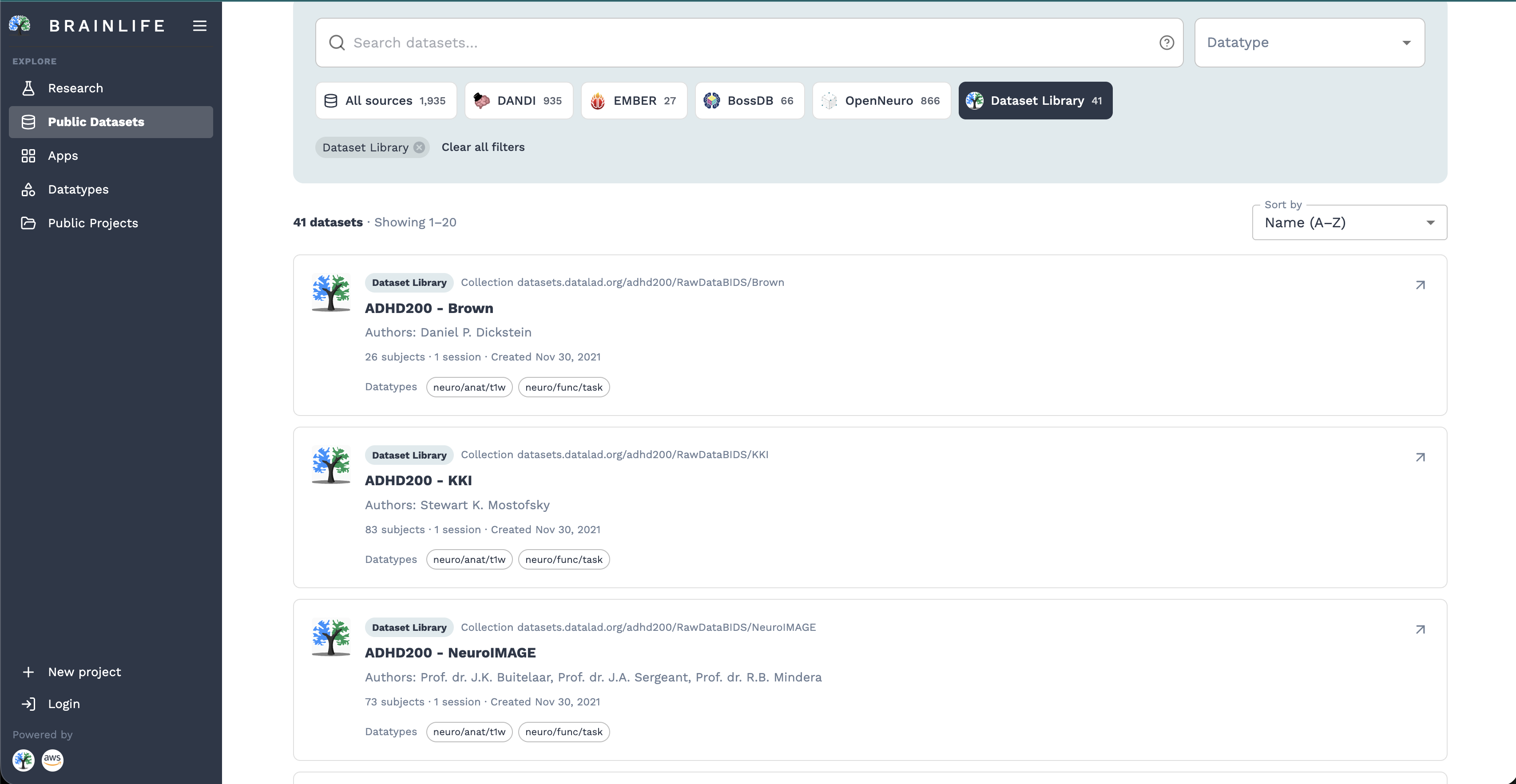
- Click on any collection card to open its detailed view (
/public-datasets/library/:collectionId).
The collection view offers two tabs:
- 1. INFO (
/info): Displays study descriptions, creators, publication links, tags, and license terms. - 2. DATA (
/data): Provides an interactive table listing all data-objects, subjects, sessions, datatypes, and BIDS annotations.
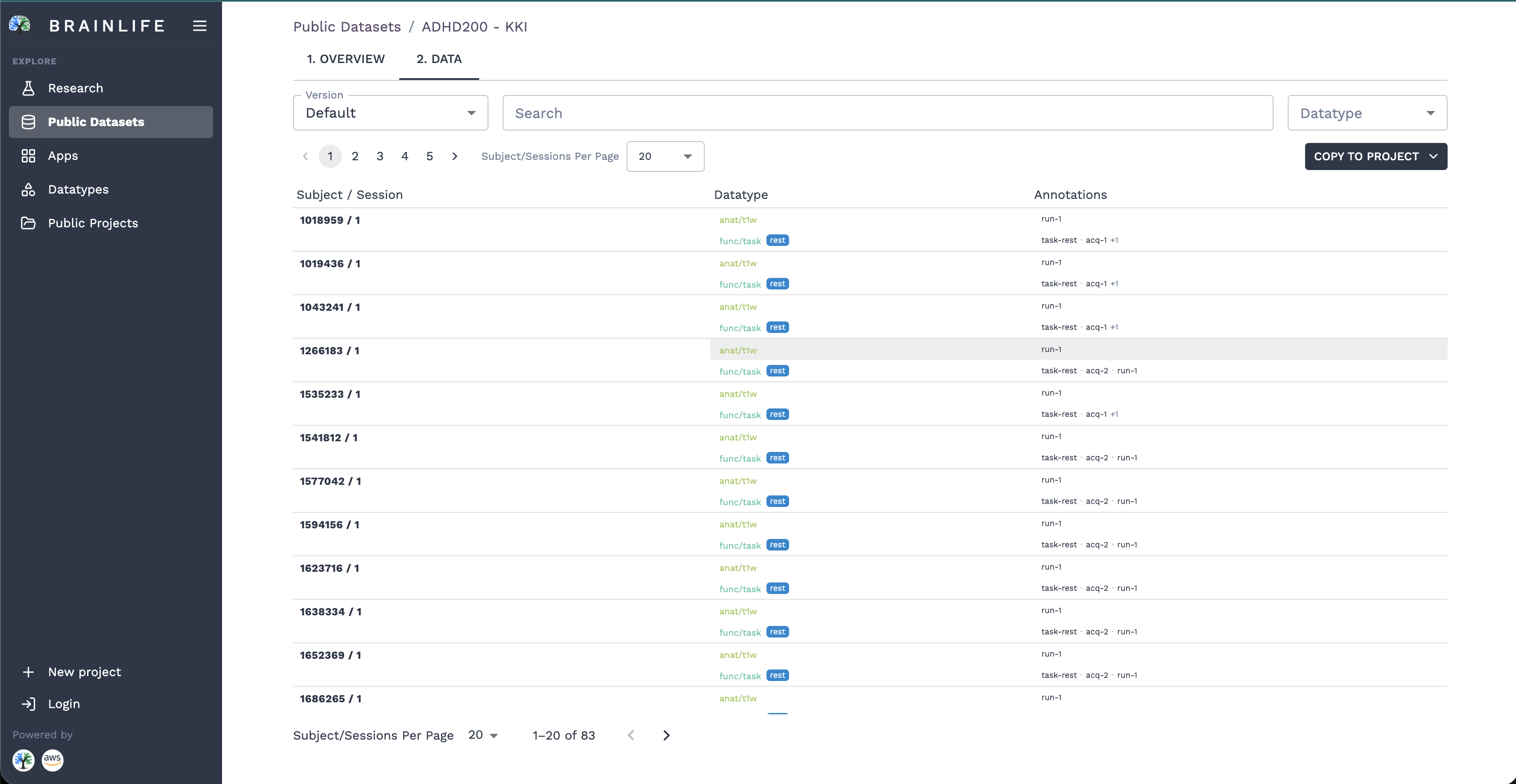
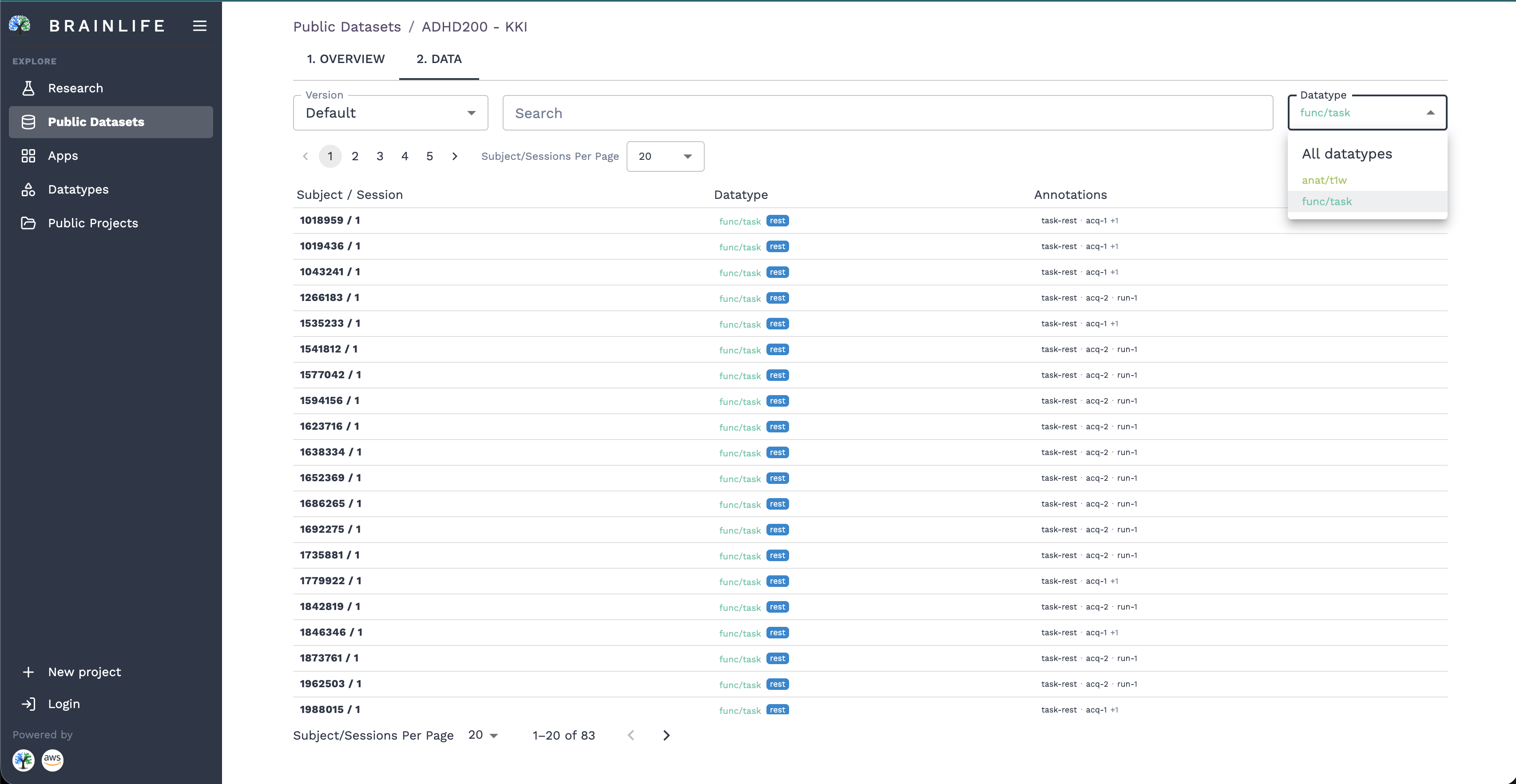
You can filter by subject ID or specific datatypes (such as neuro/anat/t1w or neuro/func/task) using the Datatype dropdown in the top-right toolbar:
2. Copying Data into a Project #
To use data from the Dataset Library in your workflows, click the COPY TO PROJECT button in the upper-right corner of the collection page. This opens the Copy data to project popover:
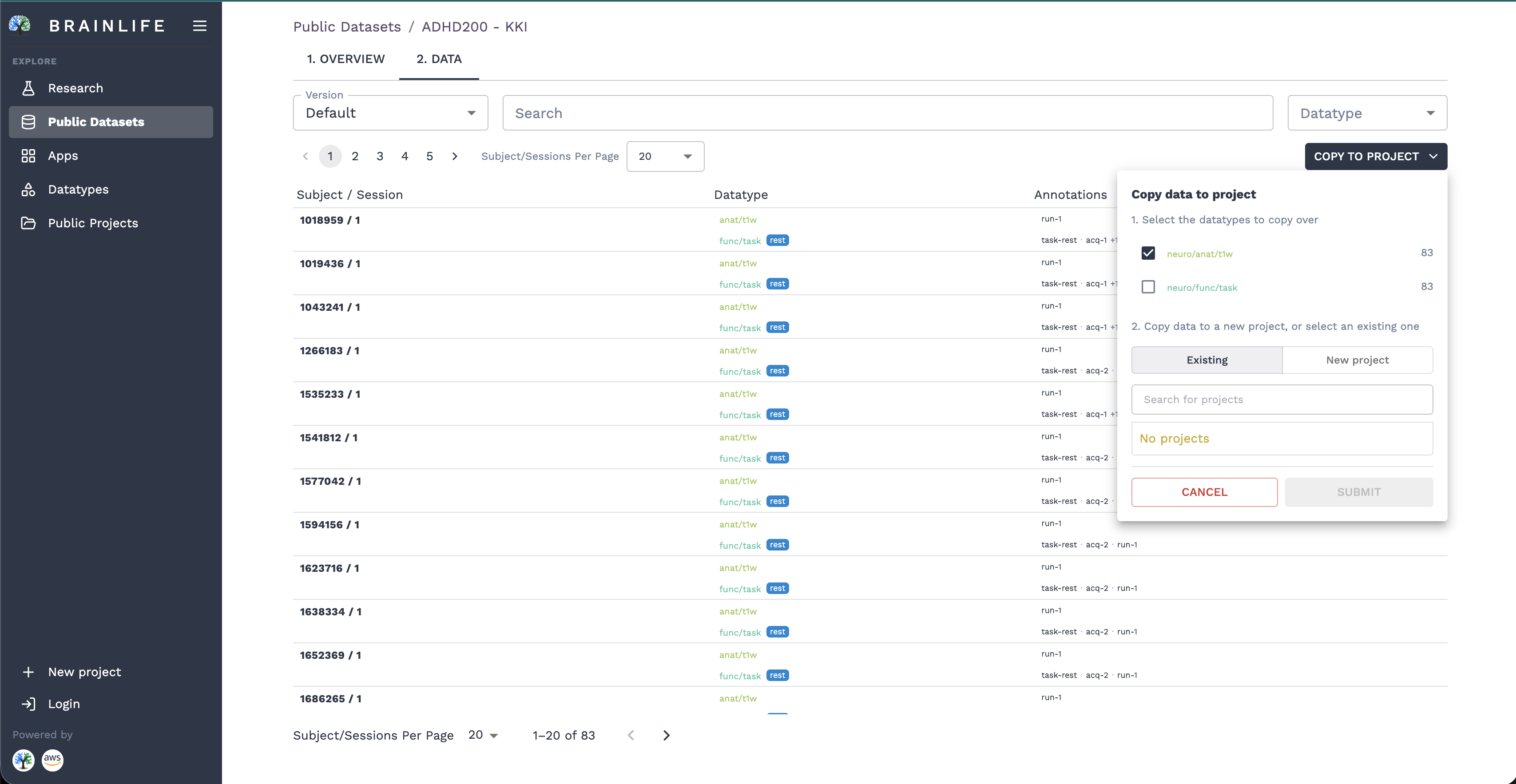
Step 1: Select Datatypes #
The modal displays a checklist of all datatypes present in the dataset, along with their data-object counts (e.g., neuro/anat/t1w (83), neuro/func/task (83)). Select only the modalities you need for your analysis.
[!TIP] Selective importing saves cloud storage and computing resources. You only need to import the modalities required for your pipeline (such as T1w for FreeSurfer).
Step 2: Choose Destination Project #
Choose where to stage the datasets:
- New Project: Select the New tab and provide a Title (required) and Description (required).
- Existing Project: Select the Existing tab and search for one of your existing Brainlife projects from the dropdown.
Step 3: Submit #
Click Submit. Brainlife creates virtual DataLad linkages in your destination project's 2. Data tab. The data is immediately ready for running Apps, configuring automated Pipelines, or viewing in web visualizers.
3. Exploring DANDI Neurophysiology Data #
Brainlife connects directly to the DANDI Archive via /public-datasets/dandi:
- Search Dandisets: Search across public dandisets by ID or keywords.
- Dandiset Detail Page (
/public-datasets/dandi/:identifier):- Overview: View dandiset metadata, contributors, description, DOI, and external links to the DANDI repository.
- Data: Browse the complete asset hierarchy, including Neurodata Without Borders (
.nwb) files organized by subject and session.
4. Exploring BossDB Connectomics Data #
Brainlife integrates with BossDB for large-scale volumetric electron microscopy and connectomics data:
- BossDB Catalog (
/public-datasets/bossdb): Browse volumetric collections and connectomics projects hosted on open AWS cloud storage. - Dataset Details (
/public-datasets/bossdb/:id): Inspect spatial resolution, voxel dimensions, tissue source, and open 3D interactive views via Neuroglancer. - BossDB S3 Browser (
/public-datasets/bossdb/s3-browser): Navigate S3 bucket hierarchies directly in the browser to inspect raw chunks, metadata manifests, and generate direct download URLs.
5. Exploring EMBER Datasets #
The EMBER Archive (/public-datasets/ember) hosts FAIR neurophysiology and behavioral datasets:
- Browse electrophysiology and behavioral datasets.
- Inspect study metadata, participant demographics, and DANDI-compatible data assets.
Working with Imported Data #
Once data from any public repository is copied into your project:
- 2. Data Tab: Data appears immediately in your project's data table.
- Run Apps: Launch preprocessing workflows (e.g., fMRIPrep, QSIprep, FreeSurfer) from the Apps catalog.
- Automate Pipelines: Set up pipeline automation rules to trigger downstream Apps whenever new subjects are staged.
- Web 3D Visualization: Inspect volumes, surfaces, and time-series directly in your browser.
[!NOTE] Public datasets are linked as virtual pointers. Raw files are fetched on-demand by compute clusters only when an App task or download is requested.